
An analyst on every shift, who shows its working.
Oneview’s AI drafts boards, writes formulas, answers questions and writes the morning note. It always proposes first, explains the maths, and waits for you to apply it.
Describe the data. Get a first board.
After an upload, Oneview asks what the data is about. The AI reads column names, types and summary statistics, never the whole table, and proposes measures, links between tables, filters and a layout.
- Units and meanings for each column: minutes, tonnes, PPM, shift codes.
- Measures with the right maths, such as OEE as availability × performance × quality.
- A multi-page board with KPIs, trends, breakdowns and page filters.
- No AI? Quick layout builds a rule-based starter board instead.
Production runs: 2,098 rows, one per line, shift and day. Planned and run minutes, ideal rate, units produced and good units.
Stoppage log: linked on line and date; minutes and reason.
Proposed measures
Availability % = SUM([Run minutes]) / SUM([Planned minutes])
Quality % = SUM([Good units]) / SUM([Units produced])
OEE % = [Availability %] × [Performance %] × [Quality %]
Board: Overview, Downtime, Lines. Filters: Plant, Line, Shift, Date.
Formulas from plain words.
Type what you mean the way you would say it to a colleague. The AI writes the measure or calculated column, explains it, and shows the value before you save.
The same works for card changes. Select a chart, say “show it by shift, top five reasons only”, review the plan and apply.
Scrap % = SUM([Scrap]) / (SUM([Good output]) + SUM([Scrap]))
Summed first, then divided, so each line’s weight follows its volume. Format: percent, one decimal.
The morning note, written for you.
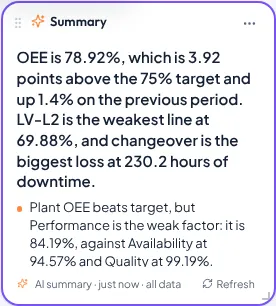
The AI summary card reads the other cards on its page and writes the main finding with three or five to seven supporting points, quoting the real numbers for the filters in use.
- Refreshes when filters change, or on demand.
- Respects row-level security: a Riverside manager’s note only mentions Riverside.
- Choose the focus: “OEE against the 75 % target, the weakest line and its biggest loss.”
AI in every part of the product.
Each of these is a button in the studio or the app, not a separate chat window.
Ask your data
Type a question; Oneview proposes a chart and computes it from your data.
Insights
Findings grounded in the numbers currently on the board.
Design a page
Describe a plant portal; the AI picks sections, a design kit and writes the copy.
Restyle a section
“Darker, more industrial, bigger numbers.” Review, then apply.
Suggest form fields
“Near-miss report with location, severity and a photo” becomes a ready form.
Fill from a photo
A photo of a paper slip, label or invoice fills the form fields.
Workflow step
Classify a defect, set a priority or draft a reply inside an approval flow.
Guided cards
“Compare things”, “a trend”, “a breakdown”: answer two questions and get the card.
Your data stays your data.
In your own installation, AI is an option you control, not a dependency.
- Oneview sends the AI a profile of the data (table and column names, types, totals and the aggregates on screen), not your raw tables.
- You supply your own Anthropic API key, kept on your server. No key, no AI; everything else keeps working.
- AI changes are proposals. Nothing is applied until someone presses Apply, and undo is always available.
- The online trial includes 40 AI requests a day per account. Your installation has no such limit.
Try it on your own numbers today.
Upload a shift report and see your first board in minutes. When you are ready, Oneview installs in your datacenter or your own cloud, under one perpetual licence.
What the free trial includes
- 5 demo plant apps to explore and edit
- 1 project of your own, from Excel or a blank canvas
- 40 AI requests a day
No card, no install. Sign in with Google or Microsoft, or an e-mail address.